Wood Autumn: A Versatile Display Font for Creative Workflows
In the landscape of digital design, selecting the right typeface is often the difference between a concept that resonates and one that falls flat. Wood Autumn stands out as a distinctive display font designed to inject personality, warmth, and playfulness into visual projects. It is not merely a collection of characters; it is a tool that influences the tone of communication. For professionals ranging from small business owners to freelance graphic designers, integrating a font like Wood Autumn into a workflow requires an understanding of its specific aesthetic strengths and how it functions within broader design systems.
This article explores the practical application of Wood Autumn, focusing on how to implement it effectively across various stages of a creative process. By examining its compatibility with different media, its role in branding consistency, and its integration with standard design software, creators can maximize the impact of this cute display font while maintaining professional standards.
Understanding the Aesthetic and Functional Role of Wood Autumn
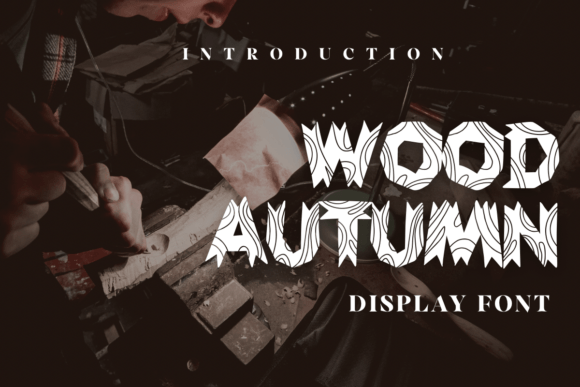
Before integrating any asset into a project, it is essential to define its purpose. Wood Autumn is categorized as a display font, meaning it is optimized for headlines, logos, and short bursts of text rather than long-form body copy. Its "cute" and whimsical character makes it particularly effective for brands or projects aiming to evoke feelings of nostalgia, comfort, or approachability. The organic curves and playful structure of the letters mimic the natural imperfections found in autumn leaves or hand-carved wood, providing a tactile quality that digital screens often lack.
In a professional workflow, identifying where a font fits is the first step toward efficient execution. Wood Autumn excels in scenarios where the goal is to capture attention quickly. Whether you are designing a social media post for a seasonal campaign or creating a logo for a boutique coffee shop, this font serves as a visual anchor. It signals to the audience that the content is friendly and inviting. However, because of its decorative nature, it must be paired strategically with more neutral sans-serif or serif fonts to ensure readability and balance.
Defining the Scope of Use
The versatility of Wood Autumn allows it to span multiple industries, but its effectiveness depends on context. It is highly suitable for:
- Lifestyle and Wellness Brands: Where a gentle, human touch is required.
- Children's Products: Toys, books, and educational materials benefit from its playful geometry.
- Seasonal Marketing: Particularly for fall-themed campaigns, harvest festivals, or holiday promotions.
- Creative Stationery: Invitations, greeting cards, and journals where personal expression is key.
Conversely, using Wood Autumn for legal documents, technical manuals, or corporate financial reports would undermine the seriousness required by those contexts. Understanding these boundaries ensures that the font enhances the message rather than distracting from it.
Integrating Wood Autumn into Design Processes
The integration of a new font into a design workflow involves several phases: preparation, execution, and quality control. When working with Wood Autumn, the preparation phase begins with file management and software compatibility. Most modern design tools, including Adobe Illustrator, Photoshop, Canva, and Figma, support OpenType and TrueType formats, which are standard for downloadable fonts like Wood Autumn. Ensuring the font files are correctly installed on your operating system before starting a project prevents last-minute technical hurdles.
Pre-Project Planning and Asset Organization
Effective planning involves deciding how Wood Autumn will interact with other visual elements. Before opening your design software, sketch out the hierarchy of information. Determine which words need the emphasis that Wood Autumn provides. Often, a single word or a short phrase rendered in this font carries more weight than a paragraph. This decision-making process helps maintain clarity. If you are designing a banner, for instance, you might reserve Wood Autumn for the main headline while using a clean, legible font for the call-to-action button or supporting details.
Organization also extends to color palettes. Because Wood Autumn has a warm, earthy connotation, it pairs naturally with muted tones, creams, deep oranges, and forest greens. Testing these combinations early in the process saves time during the revision stage. Create a style guide that specifies the font size, kerning (spacing between letters), and line height when using Wood Autumn. Consistency in these metrics is crucial for maintaining a polished look across different deliverables.
Practical Applications Across Various Media
The true value of Wood Autumn becomes apparent when applied to real-world products and digital assets. Its adaptability allows it to transition smoothly from screen to print, provided the resolution and export settings are managed correctly.
Printed Merchandise and Branding Materials
For entrepreneurs selling physical goods, Wood Autumn is an excellent choice for product customization. On mugs, t-shirts, and tote bags, the font's distinct shapes stand out against fabric and ceramic surfaces. When preparing files for print-on-demand services, ensure that the text is converted to outlines or paths. This step locks in the typography, preventing issues if the recipient does not have the font installed. Additionally, consider the texture of the material; the rustic feel of Wood Autumn complements kraft paper packaging or unbleached cotton shirts perfectly, reinforcing a cohesive brand identity.
Business cards and stationery also benefit from this font. A subtle use of Wood Autumn in a monogram or a signature line adds a personal touch without overwhelming the card's layout. In these applications, white space is just as important as the text itself. Allowing the letters room to breathe enhances their readability and aesthetic appeal.
Digital Content and Social Media Strategy
In the fast-paced environment of social media, visuals must grab attention within seconds. Wood Autumn is ideal for Instagram stories, Pinterest pins, and YouTube thumbnails. Its playful nature encourages engagement, making viewers pause to read the headline. When designing for mobile screens, pay close attention to sizing. Decorative fonts can sometimes become illegible at small sizes, so always preview your designs on actual devices before publishing.
Furthermore, Wood Autumn can serve as a recurring visual motif across a content calendar. Using the same font for all promotional graphics creates a sense of familiarity and brand recognition. This consistency is vital for marketing strategies aimed at building a loyal community. Whether you are a blogger sharing lifestyle tips or a marketer promoting a new product launch, the uniform use of Wood Autumn ties disparate posts together into a unified narrative.
Workflow Efficiency and Technical Considerations
To maximize efficiency, designers should establish a routine for managing fonts like Wood Autumn. One common pitfall is overusing decorative typefaces, which can lead to visual clutter. Adopting a rule of thumb—such as limiting Wood Autumn to headers only—streamlines the design process and reduces decision fatigue. This constraint forces creativity in other areas, such as imagery and layout composition.
Compatibility is another critical factor. When collaborating with clients or team members, ensure that everyone has access to the necessary assets. If sending editable files, include the font file or specify the exact name clearly. Alternatively, rasterizing the text into high-resolution images ensures that the design appears exactly as intended, regardless of the recipient's software setup. This practice is particularly important for final deliverables where fidelity is non-negotiable.
Quality Control and Long-Term Usability
Before finalizing any project, conduct a thorough review of the typography. Check for awkward letter spacing, especially with capital letters or at the ends of lines. Wood Autumn's unique shapes may require manual adjustment of kerning to achieve a balanced look. Zoom in to inspect the edges of the letters; they should appear crisp, not jagged or blurry. This attention to detail reflects professionalism and care in the execution of the work.
Long-term usability involves considering how the font will age with your brand. Trends in typography shift, but fonts with strong character often remain relevant longer than generic styles. Wood Autumn, with its timeless, nature-inspired aesthetic, offers durability in a changing market. By anchoring your brand identity with a font that feels authentic and enduring, you reduce the need for frequent rebranding efforts.
Conclusion on Implementation
Wood Autumn is more than just a cute display font; it is a strategic asset for anyone looking to add warmth and character to their designs. By understanding its limitations and leveraging its strengths, professionals can create compelling visuals that resonate with audiences across banners, merchandise, and digital platforms. Successful implementation relies on careful planning, consistent application, and a keen eye for detail. When integrated thoughtfully into your workflow, Wood Autumn transforms simple text into an engaging experience, helping you enjoy the creative process while delivering high-quality results.